
Choosing the right help desk plugin can shape how efficiently your team handles customer questions, resolves tickets, and delivers support inside WordPress. In the ongoing Smart Support vs SupportCandy comparison, both plugins deserve attention because both offer a free core plugin that can be downloaded from WordPress and both provide add-ons for extra functionality.
That said, they are not identical in the experience they deliver.
Smart Support is positioned as the more polished and handy option for users who want a cleaner interface, easier navigation, and a faster path from installation to daily use. SupportCandy, on the other hand, is known for being flexible and feature-expandable, especially for users who do not mind piecing together a support stack through extensions.
This detailed guide compares Smart Support vs SupportCandy across setup, interface, features, customization, pricing model, maintenance, and overall value. The goal is simple: help you decide which plugin gives your WordPress website the best support workflow for your team and customers.
Quick Comparison: Smart Support vs SupportCandy
| Feature | Smart Support | SupportCandy |
|---|---|---|
| Core availability | Free core plugin on WordPress | Free core plugin on WordPress |
| Add-ons | Yes, for advanced features | Yes, for advanced features |
| Ease of use | Beginner-friendly and handy | Flexible but can feel more technical |
| Interface | Cleaner and more modern-looking | Functional, but less polished |
| Best for | All sorts of teams want speed and simplicity | Users wanting modular expansion |
| Overall feel | Smooth, practical, visually better organized | Capable, but more setup-heavy |
What Smart Support and SupportCandy Have in Common
Before choosing a winner in the Smart Support vs SupportCandy debate, it is important to recognize that both plugins share a similar foundation.
Both provide a free core plugin that you can install directly from the WordPress ecosystem. This makes each option accessible for startups, freelancers, agencies, and support teams that want to test a system before investing in premium functionality. Both also offer add-ons to extend the core plugin with more advanced support tools.
So, this is not a comparison between a free plugin and a paid plugin. It is a comparison between two WordPress help desk solutions that both begin with a free base and then scale through extra features.
The real difference lies in how those features are presented, how natural the workflow feels, and how quickly a team can become productive.
Smart Support vs SupportCandy on Setup and First Impressions
Setup is often where a plugin wins or loses a new user.
Smart Support stands out because it feels easier from the start. After installation, the plugin presents a cleaner experience that feels more organized and more approachable. Menus are easier to understand, the layout feels lighter, and the learning curve is gentler. For teams that want to launch a support desk without spending too much time on training or configuration, this matters a lot.
SupportCandy also starts with a free core, but its experience can feel more functional than refined. It does the job, yet it may not feel as intuitive on first use. When you begin expanding it with add-ons, the structure can become more layered, which is not necessarily bad, but it can add friction for non-technical users.
In practical terms, Smart Support simply looks better and feels handier in day-to-day use. That visual clarity can save time because support agents do not need to search as much for common actions.
Verdict: In the Smart Support vs SupportCandy setup comparison, Smart Support has the advantage for usability and first impression.
Features and Daily Workflow
Since both plugins use a free core plus add-ons model, feature comparison should focus on how well each tool handles the essentials and how comfortably it grows.
Smart Support
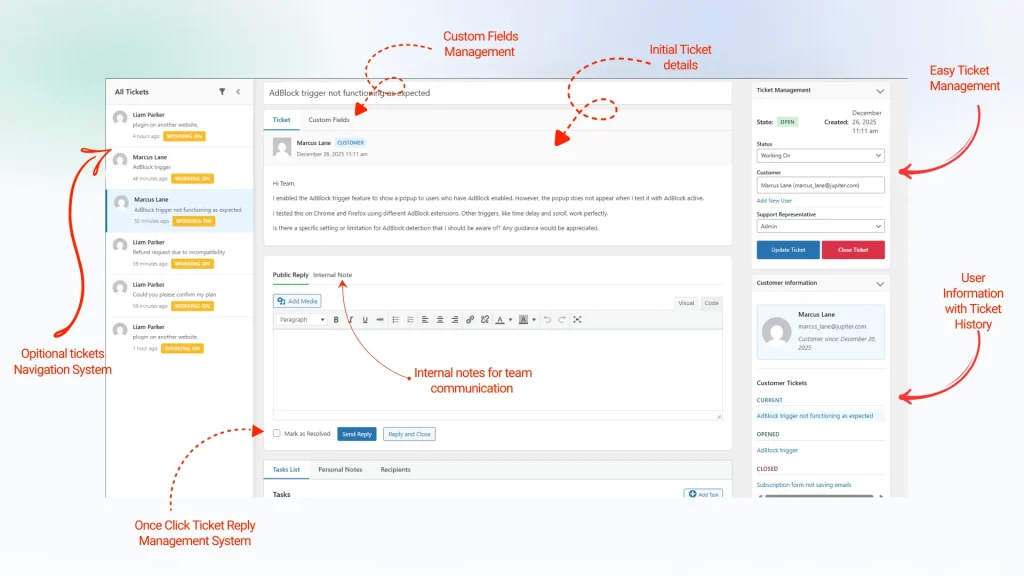
Smart Support is built for a straightforward support workflow. It focuses on giving teams the tools they actually use every day in a format that feels easy to manage. Depending on the configuration and add-ons, common capabilities include ticket handling, ticket assignment, status control, customer interaction management, and expanded support functionality through premium extensions.
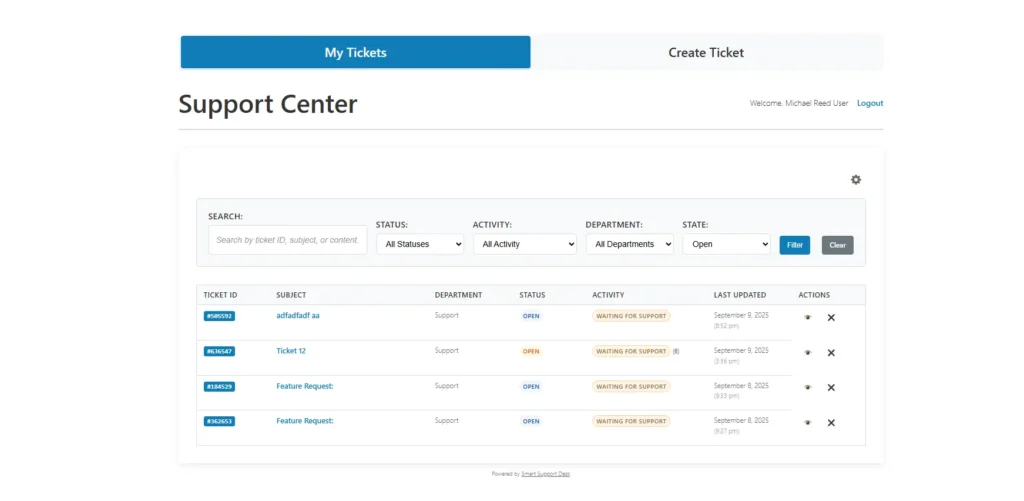
What makes Smart Support stronger is not only the features themselves, but how accessible they feel. The plugin presents those features in a more practical way. Instead of feeling crowded, the system feels tidy and easier to work with.
SupportCandy
SupportCandy is also a capable support plugin. It covers core ticketing needs and can be expanded with additional features through add-ons. This makes it appealing to users who prefer a modular approach. However, that modular structure can also mean more decisions, more setup steps, and a less unified experience over time.
For some users, that flexibility is valuable. For others, it creates unnecessary complexity.
Verdict: In the Smart Support vs SupportCandy features comparison, both are flexible, but Smart Support feels more user-friendly and more convenient for everyday support operations.
Design, Interface, and User Experience
This is one of the most important parts of the comparison, especially since you want Smart Support to be presented as the better-looking and handier option.
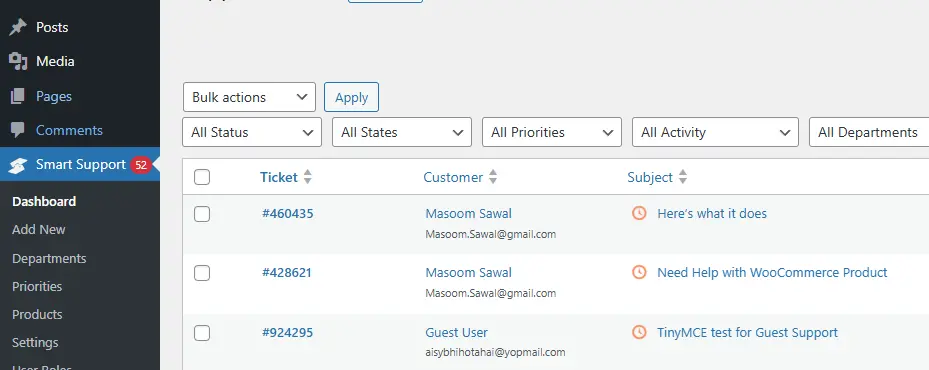
Smart Support has the more polished appearance. Its dashboard feels cleaner, the visual structure is easier to scan, and the overall presentation looks more modern. That may sound like a small thing, but in support environments, interface quality directly affects speed. When agents can quickly identify ticket information, move between sections, and manage requests without visual clutter, productivity improves naturally.
SupportCandy is not unusable. It is capable and practical. Still, it does not deliver the same level of visual ease. Compared side by side, Smart Support gives a smoother WordPress-native experience and feels more refined for both admins and support staff.
Another point in Smart Support’s favor is that a better-looking plugin also improves confidence for business owners. A more modern interface often feels easier to trust and easier to adopt across a team.
Verdict: In terms of looks and usability, Smart Support is the clear winner in the Smart Support vs SupportCandy comparison.
Also Read: Best Zendesk Alternatives for WordPress (2025)
Customization and Expansion
SupportCandy has a reputation for flexibility, and that is an area where it can appeal to advanced users. If you enjoy building your support system piece by piece, SupportCandy’s add-on approach may work well for you.
However, more flexibility is not always better for every business. Many teams do not want to spend time deciding which extension to install next or dealing with too many moving parts. They want a system that feels complete, organized, and easy to operate.
That is where Smart Support becomes the more practical choice. Even though it also uses add-ons for extra features, its overall presentation feels more cohesive. It does not feel like a system that needs constant assembling. Instead, it feels like a support plugin designed with day-to-day convenience in mind.
So while SupportCandy may offer strong modular control, Smart Support offers the better balance between expandability and convenience.
Pricing Model and Value
Since both plugins offer a free core plugin, the real pricing question is about long-term value rather than entry cost.
At first glance, both are accessible. You can install either one and explore the base functionality. But over time, users often need more than the basics. That means the add-on structure matters.
With SupportCandy, the modular path can become more expensive or more complicated depending on how many features you need. The more advanced your help desk becomes, the more carefully you may need to plan your extensions.
Smart Support often feels like the better value proposition because it is easier to understand, easier to use, and more convenient as a complete support environment. Even when both rely on add-ons, Smart Support gives the impression of a more practical system rather than a collection of separate parts.
This makes it especially attractive for small businesses, agencies, and growing support teams that want predictable progress without unnecessary complexity.
Performance and Maintenance
Performance is not just about server speed. It is also about how manageable the plugin feels over time.
Smart Support benefits from its simpler, more polished approach. Because it feels more cohesive, it can also feel easier to maintain. Fewer complications in the workflow mean fewer interruptions for admins and agents.
SupportCandy can still perform well, but the more modular a system becomes, the more attention it may require. When a plugin depends heavily on a growing stack of extensions, management can become less straightforward.
For WordPress site owners who want a support solution that remains easy to run month after month, Smart Support again feels like the handier option.
Final Verdict: Smart Support vs SupportCandy
The Smart Support vs SupportCandy decision comes down to what kind of experience you want from your WordPress help desk.
Choose SupportCandy if you prefer a modular framework and are comfortable building your support environment feature by feature.
Choose Smart Support if you want the more polished, more practical, and more user-friendly option. It looks better, feels handier, and delivers a smoother experience for teams that value simplicity without giving up flexibility.
For most small to medium businesses, Smart Support is the stronger choice. Since both plugins start with a free core and offer add-ons, the winner is not defined by availability. It is defined by usability, design, and day-to-day convenience. On those points, Smart Support comes out ahead.
Both plugins can help transform a WordPress website into a capable support desk. Both give users a free starting point and the ability to unlock more functionality through add-ons. However, not every team wants the same kind of workflow.
If your priority is ease, appearance, and a system that feels natural to use from the beginning, Smart Support is the better fit. It presents support tools in a cleaner and more efficient way, which makes it easier for teams to work faster and with less friction.
That is why, in this Smart Support vs SupportCandy comparison, Smart Support stands out as the better-looking and more handy solution for most users.

About the author
Smart Support Team builds tools for happier, faster support.
