
Customer service, efficiency and speed are paramount in the modern landscape of businesses. Smart Support Integration with Instant Knowledge Base Plugin introduces a new era in WordPress helpdesk management. By combining two powerful tools, Smart Support and Instant Knowledge Base, website owners can now deliver smarter, faster, and more effective customer support experiences. This integration empowers users to find answers quickly without always needing to submit a support ticket, streamlining the entire process.
Let’s explore how this integration works, the role of the new Smart Widget add-on, and the future enhancements planned by Smart Support.
What Is the Instant Knowledge Base Plugin?
The Instant Knowledge Base Plugin is among the most popular and effective WordPress knowledge base plugins. It allows site owners to create structured, searchable knowledge base articles that help users find answers to common queries. The plugin supports both free and premium versions, making it a versatile choice for businesses of all sizes.
Its seamless integration with WordPress themes and its ability to organize content using categories and tags make it a top-rated solution. By empowering users to self-serve, it reduces the burden on support teams.
Smart Support: A Powerful WordPress Helpdesk Plugin
Smart Support is a dynamic WordPress helpdesk plugin designed to streamline customer interactions. Known for its ticketing system, Smart Support allows users to submit support requests, track ticket statuses, and communicate with support agents within the WordPress dashboard.
Now, with the Smart Support Integration with Instant Knowledge Base WordPress documentation & wiki Plugin, the plugin has taken a major leap forward. This integration brings together the reactive nature of ticket-based support with the proactive assistance of a self-service knowledge base.
Introducing the Smart Widget Add-On
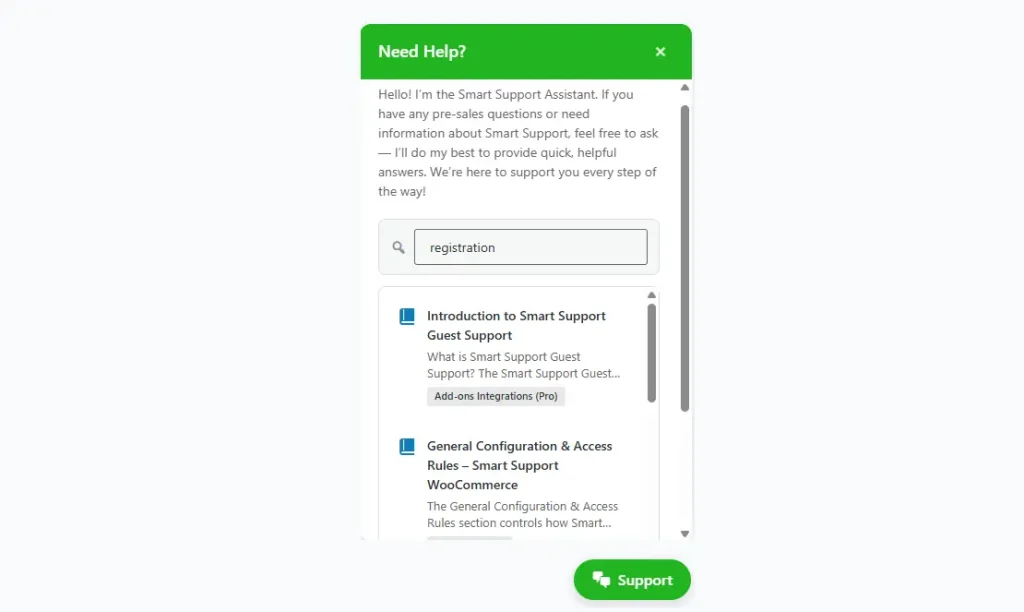
As part of the latest update, Smart Support has launched an innovative feature, Smart Widget. This front-end chat-style widget significantly improves how users interact with the support system. Instead of always opening a ticket, users can:
- Search the integrated Instant Knowledge Base from the widget.
- View related help articles instantly.
- Open a support ticket only if no relevant article is found.
This layered approach ensures a reduction in ticket volume while improving the speed at which users find answers. It enhances user experience and decreases repetitive work for support staff.
For example, if a customer is facing a common issue with a WordPress plugin setup, the widget can instantly suggest a relevant help article. Only if the user doesn’t find what they’re looking for, they can proceed to submit a support request.
Benefits of Smart Support and Instant Knowledge Base Integration
- Reduced Support Workload: Common queries are handled automatically via knowledge base articles, cutting down the number of incoming tickets.
- Enhanced User Experience: Customers get immediate help, often without needing to wait for a support agent.
- Time-Saving for Agents: By redirecting users to self-service resources, agents can focus on complex, high-priority tickets.
- Unified Support System: Both ticketing and knowledge management are integrated into one seamless environment.
A 2023 Zendesk report stated that 67% of customers prefer self-service over speaking to a company representative. This integration directly addresses that demand.
Upcoming Features: Wiki Extension
Looking ahead, Smart Support is planning to roll out a Wiki Extension. This feature will allow support agents to add quick summaries or direct support links, further improving accessibility. Users will be able to view concise answers or navigation pointers directly from the widget or ticket interface, helping them resolve issues even faster.
This wiki-style knowledge layer will provide dynamic content, curated by support agents based on real-time interactions and frequent queries.
How to Enable the Integration
Enabling the Integration with Instant Knowledge Base Plugin is simple:
- Install and activate both the Smart Support and Instant Knowledge Base plugins.
- Ensure both are updated to the latest version.
- Install the Smart Widget add-on.
- Configure the widget settings from the Smart Support dashboard.
- Begin adding articles to your knowledge base for instant searchability.
No complex configurations are needed, it’s designed for fast deployment and ease of use.
A WordPress help desk plugin Integration with a Knowledge Base plugin is a game-changer for WordPress site owners aiming to streamline their customer support. With the addition of the Smart Widget and future enhancements like the Wiki Extension, this integration doesn’t just keep support operations efficient; it transforms them.
For businesses using WordPress to manage user queries, this solution is a must-have. It reduces support ticket volume, improves user satisfaction, and empowers both users and agents with intelligent support tools.

About the author
Smart Support Team builds tools for happier, faster support.
