

Customer support teams rarely stay the same size for long. As a business gains customers, launches new products, or expands into new markets, more people often need access to the support desk. Developers may need to investigate technical tickets. Account managers may need visibility into customer conversations. Managers may need access to reports, while temporary or part-time staff may help during busy periods.
Under a traditional per-agent SaaS pricing model, every additional support user can potentially increase the monthly software bill. For a small team, that structure may be manageable. However, as the organization grows, software costs can rise simply because more employees need access.
For growing WordPress businesses, a help desk without per-agent pricing offers a different approach. Instead of treating every support agent as another subscription seat, Smart Support provides a WordPress-based support system designed around the site rather than the number of people working inside it.
Smart Support, plans support unlimited agents, unlimited tickets, and unlimited users. That distinction can make support costs easier to plan while giving businesses greater freedom to involve the right people in customer service.
Why a Help Desk Without Per-Agent Pricing Changes the Economics of Support
Per-agent pricing is common across cloud-based business software. The logic is straightforward: a company pays for the number of employees who have access to the platform.
The challenge appears when support becomes a collaborative function.
Imagine a company starts with three dedicated support agents. Later, it wants to give two developers access so they can investigate technical issues directly. Next, a customer success manager needs visibility into strategic accounts, and a support manager joins the team.
The organization has not necessarily received dramatically more functionality from its help desk. Nevertheless, the number of paid seats may have more than doubled.
A help desk without per-agent pricing separates the cost of the help desk from routine team expansion. As a result, organizations can make access decisions based on operational requirements instead of worrying about the incremental software cost of every additional employee.
This can be particularly valuable for:
- WordPress product companies
- Plugin and theme developers
- Digital agencies
- Managed WordPress service providers
- WooCommerce businesses
- Hosting companies
- SaaS companies using WordPress for customer-facing services
- Internal IT and customer success teams
The difference becomes more important as several departments begin collaborating on customer issues.
The Hidden Operational Cost of Per-Agent Pricing
The most obvious impact of per-agent pricing is the subscription bill. However, there can also be an indirect operational cost.
When every seat costs additional money, organizations may intentionally restrict access to their help desk. Developers might receive ticket information through Slack or email instead of seeing the complete conversation. Managers might rely on manually prepared summaries. Sales or customer success employees may have to ask support representatives for updates.
Those workarounds can create fragmented customer information.
For example, imagine a customer reports a compatibility problem with a WordPress plugin. A support agent receives the ticket but needs assistance from an engineer. If the engineer does not have help desk access, the agent may copy the error message into another communication channel, wait for an answer, and then copy the response back into the ticket.
The process works, but it creates unnecessary handoffs.
This is where a help desk without per-agent pricing can have benefits beyond the subscription cost. Giving additional employees access no longer needs to be viewed primarily as a licensing decision. Instead, access can be granted according to the workflow that produces the fastest and most accurate customer response.
A Simple Example: Growing From 3 Agents to 15
Consider two hypothetical support platforms.
Platform A uses per-agent subscriptions.
Platform B uses site-based licensing and allows unlimited agents.
A business initially has three support employees. Both options may fit its requirements. During the following two years, however, the company grows and eventually wants 15 people to participate in support.
Under a per-agent model, the business may need to purchase 12 additional seats. Depending on the platform and plan, the resulting annual cost increase could become significant.
With the site-based approach, adding people does not inherently require buying another seat for every team member.
The exact financial advantage will always depend on the products being compared, their features, contract terms, and current prices. Therefore, businesses should compare total annual costs rather than evaluating the advertised starting price alone.
For current Smart Support plan information, visit the Smart Support pricing page.
Smart Support: A Help Desk Without Per-Agent Pricing for WordPress
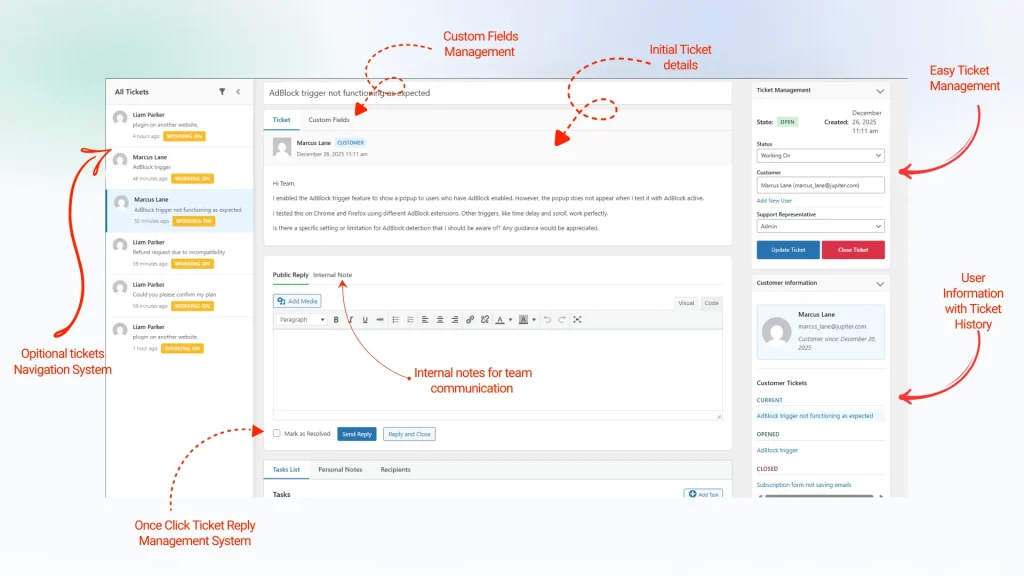
Smart Support takes a different approach because the ticketing system runs within WordPress rather than operating solely as a third-party SaaS inbox.
Its website currently promotes unlimited agents, tickets, and users, making it particularly relevant for organizations seeking a help desk without per-agent pricing.
Instead of sending the entire support operation to an external platform, organizations can integrate the help desk into their existing WordPress environment.
This model provides several potential advantages.
1. Add support agents as your organization grows
Businesses can involve additional team members without treating every new agent as a separate help desk subscription.
That can make it easier to include developers, managers, account representatives, or specialist employees when complex tickets require their expertise.
2. Keep support inside WordPress
For organizations already operating heavily through WordPress, adding another external system can create an additional administrative environment.
Smart Support is built for WordPress, allowing support operations to remain closely connected with the website and the broader WordPress workflow.
You can review its capabilities on the Smart Support Features page.
3. Maintain control of support data
Because Smart Support takes a self-hosted WordPress approach, businesses can retain greater control over where their support information is stored.
This can be especially relevant when tickets contain customer account details, technical information, order context, or other business-sensitive data.
4. Extend the system when requirements become more advanced
A growing support team may eventually need more than basic ticket management.
Smart Support provides add-ons that extend the core help desk with capabilities for specialized workflows. This means a company can begin with its essential support requirements and expand the system as its processes mature.
Unlimited Agents Do Not Mean You Should Give Everyone Access
Removing per-agent pricing does not mean every WordPress user should automatically become a support agent.
Access should still follow appropriate security and operational controls.
Organizations should define which employees require ticket access, assign suitable WordPress roles and permissions, remove access when employees leave or change responsibilities, and maintain clear ownership of customer conversations.
The advantage is that these decisions can be driven by security and workflow requirements rather than by the desire to avoid purchasing another software seat.
For a WordPress business evaluating a help desk without per-agent pricing, this distinction matters. The question changes from “Can we afford another agent license?” to “Will giving this person access improve the customer experience?”
That is generally a healthier way to design a support operation.
What Growing Teams Should Compare Before Choosing a Help Desk
Pricing is important, but it should not be the only factor in a help desk decision.
Before choosing a platform, evaluate:
Total cost of ownership. Calculate what the system is likely to cost with your expected number of agents in one, two, and three years.
Ticket volume limitations. Check whether pricing or functionality changes as ticket volume increases.
User limitations. Determine whether customers, contacts, or organizations are capped by the plan.
Data ownership. Understand where customer support information is stored and how easily it can be exported.
WordPress integration. If WordPress is central to your business, consider whether operating support natively can simplify administration.
Extensibility. Look at whether features can be added as requirements become more sophisticated.
Support workflow. Consider how easily developers, managers, billing staff, and other specialists can collaborate with front-line agents.
These factors provide a more meaningful comparison than simply looking at the cheapest introductory plan.
WordPress-Native Support Can Reduce Tool Fragmentation
Many WordPress businesses already rely on a large software stack. They may use separate systems for project management, analytics, CRM, billing, communication, documentation, and customer service.
Every additional SaaS application introduces another login, another integration, another billing relationship, and another location where company data may be stored.
A native WordPress help desk can consolidate part of that workflow.
Smart Support’s core plugin is available through the official Smart Support plugin page on WordPress.org, giving WordPress administrators a direct way to evaluate the platform within the ecosystem they already use.
For teams that prefer to manage support from WordPress, this can be a practical alternative to adding another independent SaaS application.
When Per-Agent Pricing May Still Make Sense
Per-agent SaaS pricing is not automatically a poor choice.
Large hosted help desk platforms may offer extensive ecosystems, highly specialized enterprise functionality, sophisticated omnichannel capabilities, or integrations that a particular organization considers essential.
Furthermore, companies that want the vendor to manage essentially all infrastructure may prefer a fully hosted SaaS service.
The better question is whether those benefits justify the pricing structure for your specific team.
A two-person support department with little expected growth may not care greatly about seat-based licensing. A WordPress company expecting to expand from five support participants to 20, however, may view the calculation very differently.
Therefore, the pricing model should be evaluated alongside the team’s expected growth rather than only its current headcount.
Predictable Pricing Gives Teams More Freedom to Collaborate
Support has increasingly become a cross-functional responsibility. A difficult customer problem may involve support representatives, developers, product managers, WooCommerce specialists, account managers, and leadership.
A pricing structure that charges for every participating employee can make that collaboration more expensive as the organization scales.
A help desk without per-agent pricing removes one of those barriers.
Smart Support’s WordPress/site-based approach is particularly interesting for businesses that want unlimited agents, tickets, and users while keeping their support system closely connected to WordPress.
Organizations can explore Smart Support Features, compare current options on the Pricing page, review available Smart Support add-ons, or install the core Smart Support plugin from WordPress.org.
The real cost of customer support software becomes clearer as a company grows.
A system that appears affordable with three agents can represent a very different expense when 10, 20, or more employees need access. Moreover, limiting seats to control costs can make collaboration between support, development, management, and customer success more complicated.
Ultimately, choosing a help desk without per-agent pricing gives growing WordPress teams an alternative: expand the people involved in customer support without automatically increasing licensing costs for every new agent.
Smart Support’s combination of unlimited agents, unlimited tickets, unlimited users, WordPress integration, self-hosted control, and optional extensions makes it a compelling model for businesses that want their help desk costs to be driven by the solution they need rather than simply by the number of employees serving customers.

About the author
Smart Support Team builds tools for happier, faster support.