

Help Scout has built a strong reputation around simple customer communication, shared inboxes, and an interface designed to keep support conversations feeling personal. For many companies, especially those wanting a polished hosted SaaS experience, that approach can work very well.
However, WordPress businesses often have needs that go beyond operating a shared inbox.
A WooCommerce store may need support agents to understand customer accounts and orders. A plugin company may want ticket history connected closely with its website users. An agency may prefer to keep sensitive client communications inside infrastructure it controls. Meanwhile, a growing support team may want to avoid adding another paid seat every time a developer, manager, or account representative needs ticket access.
For these organizations, a Help Scout alternative for WordPress can offer a fundamentally different approach.
Smart Support is a full feature self-hosted, WordPress-native help desk designed to bring ticket management directly into the WordPress environment. Rather than treating WordPress as something that must connect to an external support platform, it makes WordPress itself part of the support system.
That difference can be especially important for companies where WordPress already sits at the center of customer operations.
Help Scout vs Smart Support: Different Support Philosophies
Help Scout and Smart Support are not simply two versions of the same product.
They are built around different operating models.
Help Scout is a hosted customer support platform. Businesses access the service through Help Scout’s infrastructure and use its shared inbox and support tools as an external SaaS application.
Smart Support operates inside WordPress.
This distinction affects where customer data lives, how workflows are customized, how team access is handled, and how support connects with the rest of a WordPress-based business.
| Area | Help Scout | Smart Support |
|---|---|---|
| Platform type | Hosted SaaS | Self-hosted WordPress help desk |
| Core experience | Shared inbox and customer communication | Native WordPress ticket management |
| Hosting | Managed by vendor | Runs in your WordPress environment |
| WordPress-native | No | Yes |
| Data environment | Vendor-hosted | Controlled through WordPress hosting |
| Team scaling | Depends on current Help Scout pricing and plan | Smart Support advertises unlimited agents |
| Tickets and users | Governed by service terms | Smart Support advertises unlimited tickets and users |
| Customization | SaaS settings, apps, and integrations | WordPress-native extensibility |
| Best fit | Teams wanting a polished managed inbox | WordPress-focused teams wanting control and integration |
As pricing and features may change over time, businesses should review the latest information from both providers before making a purchasing decision.
Why Businesses Search for a Help Scout Alternative for WordPress
Help Scout’s simplicity is one of its strengths. However, simplicity can become less valuable when support needs are deeply connected with WordPress.
Consider a plugin company.
A customer opens a ticket about a compatibility problem. The support agent may need to identify the customer’s WordPress account, product, subscription, documentation history, and possibly other site-related information.
If the help desk exists outside WordPress, some of that context may need to be retrieved through integrations, copied manually, or viewed in another browser tab.
A Help Scout alternative for WordPress can reduce that separation.
Instead of building bridges between an external help desk and WordPress, support can operate within the same ecosystem as the website itself.
Companies often consider this approach because they want:
- Better control over support data
- WordPress-native administration
- Closer integration with customers and website workflows
- Greater customization flexibility
- Fewer separate SaaS tools
- More predictable scaling for larger support teams
- Easier collaboration between support and technical staff
These benefits are particularly relevant to businesses that already depend heavily on WordPress.
Where Help Scout Makes Sense
A balanced comparison should recognize the strengths of Help Scout.
Its shared-inbox model is designed to make customer service feel familiar and manageable. Teams can work with conversations in a way that resembles email while still benefiting from structured support functionality.
That can be appealing for small and medium-sized businesses that want to avoid a highly technical help desk interface.
Help Scout may be a strong option when:
You want a hosted platform.
The vendor handles the application environment, reducing the infrastructure burden on your team.
You prefer a shared-inbox experience.
Businesses that want customer support to feel close to email may appreciate this style of workflow.
WordPress is not central to your operations.
If customer data and support processes live across many unrelated platforms, WordPress-native support may offer fewer advantages.
You want to minimize technical administration.
A managed SaaS service can reduce the amount of WordPress maintenance associated with running the help desk.
For organizations fitting those criteria, Help Scout can remain an effective customer-support choice.
When a Native Help Desk Makes More Sense
A native help desk becomes more attractive when WordPress is not just the company website but an operational platform.
For example, WordPress may already manage:
- Customer accounts
- Memberships
- WooCommerce orders
- Product subscriptions
- Documentation
- Digital downloads
- User roles
- Client portals
- Internal workflows
In that environment, moving customer support to an external platform can create unnecessary separation.
Smart Support is built to operate inside WordPress, allowing support workflows to sit closer to the information and systems agents already use.
Businesses can explore the platform’s current capabilities through the Smart Support Features page.
Data Ownership Is a Major Difference
Support tickets often contain more sensitive information than businesses initially realize.
Customers may send:
- Screenshots
- Website URLs
- Technical logs
- Order information
- Account details
- Billing questions
- Private product feedback
- Login-related information
- Internal business context
With a hosted SaaS tool, that information is stored within infrastructure managed by the service provider.
With Smart Support’s self-hosted model, the business retains greater control over the WordPress environment where ticket data is stored.
For organizations specifically seeking a Help Scout alternative for WordPress, data ownership may be one of the most important factors.
Greater control can help businesses align support data with their own:
- Backup strategy
- Hosting policies
- Access controls
- Data retention rules
- Security procedures
- Privacy processes
However, self-hosting also places more responsibility on the organization. WordPress must be kept updated, administrator accounts must be secured, backups must be reliable, and hosting infrastructure must be maintained properly.
Control is valuable only when it is paired with good security practices.
Smart Support and Team Growth
Support rarely remains limited to a small group of dedicated agents.
As ticket complexity increases, developers, product specialists, customer success managers, billing employees, and leadership may all need to participate.
That can create a pricing challenge when a platform charges according to individual agent seats.
Smart Support currently promotes unlimited agents, unlimited tickets, and unlimited users.
This can be especially relevant to businesses comparing it with hosted support tools whose commercial models may depend on user counts, subscriptions, or plan levels.
A company evaluating a Help Scout alternative for WordPress should therefore compare more than the initial monthly price.
Consider what the help desk might cost when:
- The team doubles
- Developers need access
- Managers need ticket visibility
- Seasonal employees join temporarily
- Multiple departments become involved
- Customer volume increases
The current Smart Support plans can be reviewed on the Pricing page.
Email Support Without Giving Up Structured Ticketing
Email remains one of the most important support channels for many businesses.
Customers understand it, it requires no training, and it allows them to contact support from almost any device.
Help Scout’s shared-inbox approach is naturally suited to organizations that prioritize email-style support.
A WordPress-native help desk therefore needs an effective way to handle incoming email without losing the benefits of ticket management.
Smart Support provides an Email Bridge option within its broader add-on ecosystem. This can help businesses connect email-based customer conversations with structured WordPress ticket workflows.
For teams evaluating this functionality, the available extensions can be reviewed through Smart Support Add-ons.
The important consideration is not whether customers send an email or submit a form. It is whether support agents receive the conversation in a system where it can be assigned, tracked, updated, and resolved consistently.
Front-End Support Can Improve the Customer Experience
Not every customer should need access to the WordPress admin area.
A customer-facing support experience should make it easy to create tickets, review conversations, and find help without exposing administrative functionality.
This is where front-end support becomes particularly valuable.
For businesses looking for a Help Scout alternative for WordPress, the ability to deliver customer support directly through the website can create a more integrated experience.
Instead of redirecting users to an unrelated support platform, companies can keep customer interactions closer to their own brand and website environment.
Smart Support’s extensions and support tools can help businesses build these kinds of front-end workflows. Current options are available through the Smart Support Add-ons page.
A front-end support experience can be useful for:
- WooCommerce customers
- Membership communities
- SaaS users
- Agency clients
- Plugin customers
- Course participants
- Hosting clients
Keeping support within the existing website can reduce friction and make the experience feel more consistent.
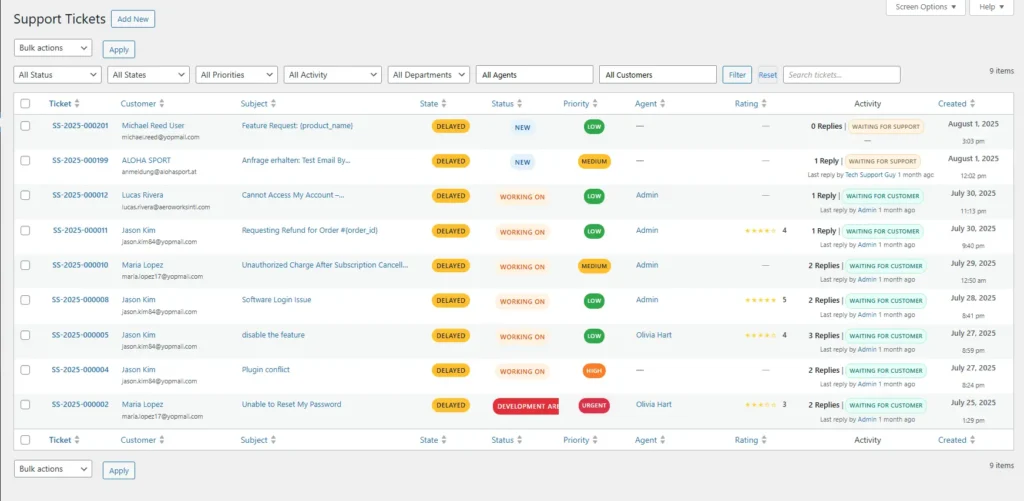
WordPress Customization Can Be a Major Advantage
One of the strongest reasons businesses choose WordPress is its flexibility.
A hosted SaaS platform provides customization within the framework defined by the vendor. WordPress, by contrast, gives developers far greater control over the broader environment.
For support teams, this can open the door to custom workflows.
A business might want to connect tickets with:
- WooCommerce orders
- Membership levels
- Subscription status
- Product licenses
- Internal dashboards
- Custom user metadata
- Customer account pages
- Documentation
- Specialized business processes
A WordPress-native help desk gives developers a familiar environment in which to build these connections.
That makes a Help Scout alternative for WordPress particularly attractive to organizations with in-house developers or established WordPress agencies managing their systems.
Fewer Separate Tools Can Mean Less Operational Friction
Software stacks tend to grow gradually.
A company starts with WordPress, then adds an email marketing platform, CRM, project management tool, analytics service, billing application, shared inbox, documentation system, and customer-support software.
Each tool may solve an individual problem well.
However, every additional platform also introduces:
- Another login
- Another billing relationship
- Another data store
- Another integration
- Another permission system
- Another employee training requirement
Consolidating customer support into WordPress can reduce some of that fragmentation.
The benefit is not necessarily fewer features. Rather, it is fewer disconnected environments.
For teams that already spend much of the day inside WordPress, Smart Support can make the support desk feel like an extension of the existing business system instead of another application employees have to manage.
When Help Scout May Still Be the Better Option
Smart Support is not automatically the best choice for every company.
Help Scout may be preferable when a business wants a managed SaaS product and places a high priority on a straightforward shared-inbox experience.
It can also make sense when:
- The company has limited WordPress expertise
- Support is not closely connected to WordPress data
- The organization wants minimal infrastructure responsibility
- A hosted SaaS workflow fits existing internal processes
- The team does not want to maintain a support system inside WordPress
In these cases, the convenience of an external platform may outweigh the benefits of native integration.
When Smart Support Is Likely the Better Fit
Smart Support becomes more compelling when WordPress plays a central role in the business.
It is worth considering when:
- Customer accounts already exist in WordPress
- WooCommerce is part of the business
- The company wants greater control over support data
- Support team headcount is expected to grow
- Per-agent pricing is undesirable
- Developers need flexibility for custom integrations
- Customers should access support through the website
- The organization already manages secure WordPress infrastructure
Under these circumstances, choosing a Help Scout alternative for WordPress is less about replacing one inbox with another and more about changing how support fits into the company’s technology stack.
How to Evaluate Smart Support
The best support system is the one that fits real operational requirements.
Before choosing a platform, document how your team currently handles tickets.
Identify:
- How customers contact support
- Which employees need access
- What customer information agents require
- Whether email needs to create tickets
- Whether customers need a front-end portal
- Which WordPress systems must be integrated
- How support information should be stored
- How quickly the team is expected to grow
Then compare those requirements with the Smart Support Features, current Pricing, and available Add-ons.
The core plugin is also available through the official Smart Support page on WordPress.org, providing WordPress administrators with another useful starting point for evaluating the platform.
Choose Between Convenience and Native Control
Help Scout and Smart Support solve customer-support problems through different models.
Help Scout offers a hosted shared-inbox experience that can be appealing to teams wanting a polished SaaS environment with minimal infrastructure management.
Smart Support takes a WordPress-native approach, giving businesses more control over their ticket data, greater flexibility for customization, and the ability to keep support connected with the WordPress systems already powering the organization.
For many WordPress companies, that distinction is more important than any single feature.
A Help Scout alternative for WordPress makes the most sense when support is deeply connected to customer accounts, WooCommerce, memberships, product workflows, or other WordPress-based operations.
Smart Support’s self-hosted architecture, unlimited-agent model, extensibility, email integration options, and front-end support capabilities provide a practical alternative for organizations that would rather keep customer service inside WordPress than build another dependency on an external SaaS platform.
Ultimately, the decision comes down to operating philosophy. If a managed shared inbox is the priority, Help Scout may be a strong choice. If ownership, WordPress integration, customization, and predictable growth matter more, Smart Support may be the better long-term fit.

About the author
Smart Support Team builds tools for happier, faster support.