
Smart Support Version 2.0.0 is a major update focused on faster ticket handling, better automation, stronger integrations, and improved support workflow-based communication. This release introduces AI assistance for agents, new REST API endpoints, API key authentication, a renamed Reports section, minor bug fixes, and several premium add-ons designed to extend the help desk experience.
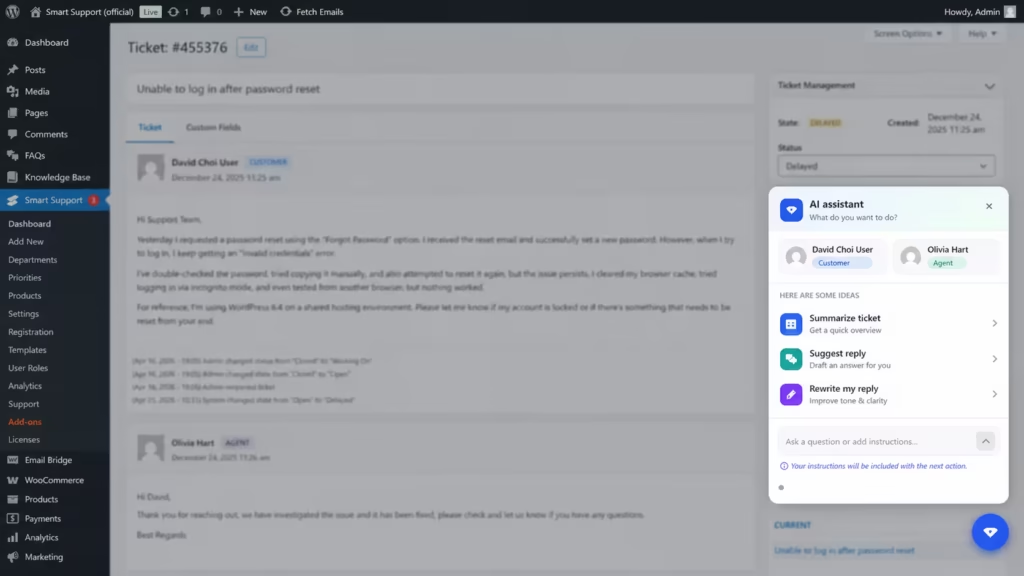
The biggest highlight of Smart Support Version 2.0.0 is AI assistance. Support agents can now use AI to summarize tickets, generate suggested replies, rewrite responses with preview, and ask questions using prompts. In addition, the new premium add-ons make it easier to connect forms, automate ticket events, collect custom information, and manage companies or organizations inside Smart Support.
AI Assistance in Smart Support Version 2.0.0
One of the most important features in Smart Support Version 2.0.0 is AI assistance support. Customer support teams often manage long ticket threads, repeated questions, and urgent customer issues. AI assistance helps reduce manual effort while still keeping the agent in control.
Agents can use AI to summarize tickets, which is helpful when conversations become long or when a ticket is transferred to another team member. Instead of reading every previous reply, an agent can quickly understand the customer’s problem, ticket history, and current status.
The suggested reply feature also improves productivity. Agents can generate draft responses based on the ticket context, then review and edit the message before sending it. This helps teams respond faster while keeping replies accurate and personal.
As Microsoft CEO Satya Nadella has said, “AI is going to be one of the trends that is going to be the next major shift in technology.” This shift is already visible in customer support, where AI tools are helping agents save time and improve communication quality.
Rewrite With Preview and Prompt-Based Questions
Smart Support Version 2.0.0 also includes rewrite with preview. This allows agents to improve a response before sending it to a customer. For example, an agent can make a reply more professional, friendly, concise, or detailed.
The preview step is important because it allows the agent to review the AI-generated version before applying it. This reduces the risk of sending unclear or unsuitable responses. It also helps maintain the company’s tone of voice across support conversations.
Agents can also ask questions using prompts. For example, they may ask AI to identify the main issue in a ticket, explain a technical problem in simpler words, or create a polite follow-up message. This gives agents a flexible assistant directly inside their ticket workflow.
REST API Endpoints for Integrations
Another major improvement in Smart Support Version 2.0.0 is the addition of REST API endpoints under smart-support/v1. These endpoints are designed for integrations and allow external systems to connect with Smart Support.
Businesses can use these endpoints to build custom workflows, connect support data with dashboards, or integrate ticket activity with CRMs and automation platforms. For developers, REST API support provides a more flexible way to extend Smart Support based on business requirements.
The release also adds API key authentication. This helps protect access to integration features by allowing only authorized systems to communicate with Smart Support. Since support tickets may include customer information, secure authentication is an important part of any integration workflow.
Analytics Renamed to Reports
In Smart Support Version 2.0.0, the Analytics menu has been renamed to Reports. Although this is a small change, it improves clarity for users.
The term “Reports” is easier to understand for many support teams. It clearly tells users where to find support performance data, ticket activity, and other reporting information. This menu change makes the interface more user-friendly, especially for non-technical users.
Premium Add-ons Added to Smart Support Version 2.0.0
Alongside the core release, Smart Support Version 2.0.0 introduces premium add-ons that help teams customize and expand their support system. These add-ons are useful for businesses that need advanced ticket creation, automation, customer data collection, and organization-based support management.
Gravity Forms Integration
The Gravity Forms Integration add-on connects Gravity Forms with Smart Support. When visitors submit mapped forms, Smart Support can automatically create tickets.
This is useful for websites that already use Gravity Forms for contact forms, quote requests, onboarding forms, or support requests. With field-based mapping, teams can map form fields to ticket subject, description, customer details, and optional routing settings such as priority, department, and product.
As a result, businesses can turn form submissions into structured support tickets without manually copying customer information.

Webhooks
The Webhooks add-on allows Smart Support to send ticket event notifications to external systems. This can include CRMs, automation tools, custom applications, and internal dashboards.
Webhooks are helpful when businesses need real-time ticket updates outside the support desk. For example, a company may want to notify a CRM when a new ticket is created or trigger an automation when a ticket status changes.
This add-on supports secure, signed outgoing webhooks. It also includes delivery logs and retries, making event delivery more reliable and easier to monitor.
Custom Fields
The Custom Fields add-on gives administrators the ability to create unlimited custom ticket fields from the backend.
This helps teams collect additional information during ticket submission. For example, a software company may want to collect license keys, website URLs, order numbers, environment details, or issue categories. These custom fields can then appear in ticket details, remain editable, and optionally be shown as sortable or filterable columns in the ticket list.
By using Custom Fields, support teams can collect better information from the beginning and reduce unnecessary back-and-forth communication.
Organizations / Company Profile
The Organizations / Company Profile add-on is designed for teams that support companies, clients, or groups rather than only individual users.
With this add-on, Smart Support can manage companies and teams as organizations. Administrators can store domains and contacts, link tickets to the right organization, and auto-match tickets based on email domains.
This is especially useful for B2B support. For example, if several employees from the same company submit tickets, those tickets can be associated with the correct organization. The add-on can also give organization contacts shared visibility on the customer portal, depending on the selected settings.
Why Smart Support Version 2.0.0 Matters
Smart Support Version 2.0.0 matters because it combines AI productivity, developer-friendly integrations, and premium workflow extensions in one release. AI assistance helps agents respond faster. REST API endpoints make integrations easier. Reports improve navigation. Premium add-ons help businesses customize their support process.
For growing support teams, these improvements can reduce manual work, improve ticket quality, and create a more connected customer service system.
Smart Support Version 2.0.0 is a strong release for teams that want a smarter and more flexible support desk. It introduces AI assistance for ticket summaries, suggested replies, rewrite with preview, and prompt-based questions. It also adds REST API endpoints under smart-support/v1, API key authentication, and a clearer Reports menu.
The premium add-ons for Smart Support make the update even more valuable. Gravity Forms Integration turns form submissions into tickets. Webhooks connect ticket events with external systems. Custom Fields help collect better ticket information. Organizations / Company Profile supports company-based customer management.

About the author
Smart Support Team builds tools for happier, faster support.
